How is CSS formatted?
It may look scary at first, but CSS formatting is easy! It coincides with the tags you’ve learned about in HTML. First, create a new file in your root folder called styles.css, then open it. To target a tag in CSS, simply type the following, replacing the tag type with whichever tag you’d prefer to target:

The curly brackets indicate the start and end of the CSS rules, much like the greater than and less than signs in HTML. In between, you can modify different properties that CSS allows you to. This may sound simple, but if you think about it, you can do a lot with CSS. You could change the color of anything, change how anything is spaced out, and even add shadow effects and borders. But, we’ll get to those possibilities later.

You can also apply CSS rules to multiple elements using commas. This saves space in the document for more important things. But how will all this CSS link together with our HTML documents? We can do this by using the <link> attribute in the head section of whichever HTML pages you’d like to apply the CSS styling to.
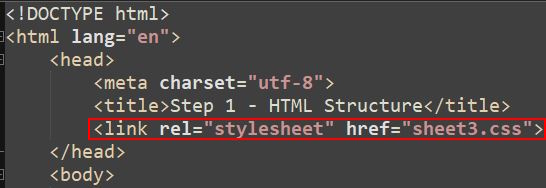
Ensure that the path is formatted correctly, so that the browser can locate the CSS document!
Uses of CSS
As stated earlier, CSS can be used to modify various visual elements of your page. For this small example, we will start with simple examples. Let’s increase the font size of all h1 tags.
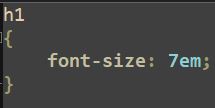
This simple piece of code has made all h1 tags within web pages that are linked to this CSS file much bigger! However, we can do even more;
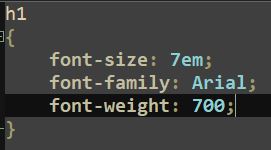
Now, the font has been changed to Arial, and the text has been bolded. There are many, many other things you can do with CSS, a list of said properties can be found here: W3Schools.